How do you carry out a stock take in your shop? Methods & tools
Taking stock of your shop is, first and foremost, a legal requirement, but it is also a key driver of performance. A well-prepared stock take helps you reduce stock discrepancies, anticipate stock-outs and manage your profit margin with precision.
So, how do you go about it? Which methods should you choose? And, above all, how can you save time by using connected till software?

Table of content
Why is it important to carry out a stock-take of your business?
Every retailer must carry out at least one stock-take a year, often at the end of the financial year. But beyond this requirement, it is an essential management tool.
Regular stock-taking enables you to:
- To ensure the reliability of stock data.
- Identify dormant, obsolete or stolen products.
- Adjust replenishment levels.
- Optimise cash flow and gross margin.
- Ensure the reliability of accounting entries.
In other words: an accurate stock take = a clear picture of your profitability and the financial health of your shop.
How can you prepare your shop’s stock take properly?
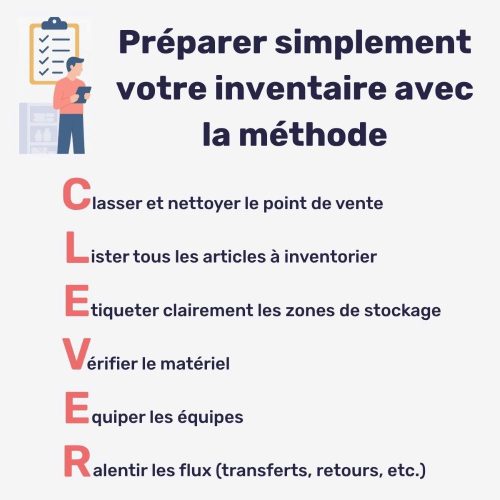
A successful stock-take relies on meticulous preparation. Plan your operations well in advance and get your teams involved. Our tip for a spot-on stock-take preparation? The CLEVER method – simple and smart. 😉
- Clean the shop
- List all items to be inventoried (stock + warehouse)
- Explicitely label storage areas
- Verify the equipment (barcode scanners, software, Wi-Fi connection)
- Equip your teams (count sheets, zone allocation)
- Reduce the flow (sales, transfers, supplier returns)
Which stock-taking method should you choose?
Depending on the size of your business, your resources, your tools, and even the time of year when you carry out your stock-take, there are several methods you can consider.
Annual stock-take vs dynamic stock-take
Annual inventory
The annual stock-take involves counting all stock on a given date, often 31 December, to close the financial year.
This is the most traditional method and is still widely used, particularly in small independent shops or retail chains that do not have real-time monitoring tools.
Pros
- A comprehensive overview of stock and accurate valuation of goods.
- Enables a comprehensive review of the discrepancies between the book stock and the actual stock.
- Facilitates the valuation of assets for accounting purposes and the preparation of the annual balance sheet.
Cons
- Temporary suspension of business: the shop often has to close or restrict sales whilst the stock is being taken.
- Significant staff deployment over a short period (often at the end of the year).
- Risk of fatigue and errors due to the heavy workload over one or two days.
Ideal for: local shops, single-outlet shops or seasonal businesses (ready-to-wear, home décor) where product turnover is limited and stock levels are easy to monitor.
Dynamic inventory
Dynamic stocktaking (also known as cycle counting) involves regular counts by product group throughout the year. Rather than halting all operations on a fixed date, you carry out several scheduled mini-stocktakes.
Pros
- No disruption to business: sales continue whilst stock-taking is underway.
- The workload is spread out over the year, so there is less pressure and fewer mistakes.
- Greater responsiveness: discrepancies are identified quickly, which improves stock reliability.
- Compatible with multi-store management or large inventories, thanks to automation and connected tools.
Cons
- More demanding organisation: requires rigorous planning and a team familiar with the method.
- There is a risk of incomplete data if certain product families are counted too infrequently.
- Accounting complexity: journal entries need to be adjusted regularly to reflect the actual stock levels.
Ideal for: multi-store chains, high-volume retail networks (cosmetics, ready-to-wear, sportswear, specialist food retailers) or any organisation equipped with connected POS software capable of tracking stock movements in real time.
Réalisez facilement vos inventaires avec Clictill
Manual counting vs electronic counting
When it comes to carrying out a shop stock-take, there are two main methods: manual counting, which is traditional but still common in small shops, and electronic counting, which is more modern and favoured by chains with multiple branches.
Manual counting
Manual stock-taking involves counting each item by hand, often using paper forms or Excel spreadsheets. It is the most intuitive method and the least expensive to implement, as it requires no specialised equipment.
Pros
- Available to all businesses, even those without technical equipment.
- Useful for small businesses with few product lines or limited stock.
- Enables a visual check of the condition of the products (damage, obsolescence, labelling errors).
Cons
- The counting process takes a very long time, especially once the stock exceeds a few hundred items.
- High error rate due to fatigue, double entry or omissions.
- Difficulty in consolidating data and valuing stock without the right tool.
In practice: manual stock-taking remains suitable for local shops or outlets with a low volume of stock, such as concept stores, bookshops or craft shops.
However, it quickly reaches its limits as soon as stock turnover increases or several people are involved at the same time.
Electronic counting
Electronic stock-taking relies on the use of a barcode scanner or a mobile terminal connected to your point-of-sale software.
Each product is scanned and automatically recorded in the database: a method that combines accuracy with time savings.
Pros
- Significant productivity gains: up to 3 to 4 times faster than manual counting.
- Improved reliability: eliminates the need for double entry and significantly reduces human error.
- Direct synchronisation with the POS solution: automatic stock updates, instant valuation, simplified export for accounting purposes.
- Compatible with rolling stock-takes or multi-site stock-takes, without disrupting sales.
Cons
- Requires an investment in equipment (readers, terminals, Wi-Fi or 4G network).
- Requires technical preparation (updating barcodes, connectivity testing, and a quick training session for staff).
- Reliance on the equipment or network functioning correctly, hence the benefit of a built-in offline mode.
In practice: electronic stock-taking is particularly recommended for chains with multiple branches, high-volume retailers (fashion, beauty, sports, specialist food retailers) and any businesses that use fully web-based point-of-sale software such as Clictill.
How can the accuracy of the meter reading be checked?
An inventory is only valuable if the data it produces is reliable.
Checking the quality of the count is therefore an essential step in ensuring consistency between the actual stock and the theoretical stock recorded in your till software.
Here are the best practices to follow before, during and after the count.
Freeze stock movements (cut-off)
First and foremost, it is crucial to establish a cut-off period: a period during which no stock movements are to take place. This includes:
- Sales and receipts,
- Supplier deliveries,
- Transfers between shops,
- Returns or stock adjustments.
Objective: to freeze the situation in order to obtain an accurate snapshot of stock levels at a given point in time. Without this freeze, simultaneous inflows and outflows distort the results and render the valuation unusable for accounting purposes.
Separate roles to avoid bias
To avoid unintentional errors (or deliberate omissions!), it is advisable to keep the roles separate:
- A team counts the items,
- Another one checks and verifies the counting,
- A supervisor checks that the totals are consistent overall.
This separation of tasks ensures clear traceability and minimises counting bias.
In large organisations, double cross-checking (where two teams count the same area independently) enables a reliability rate to be calculated for each sample.
Identify and rectify discrepancies
Once the stock take is complete, any discrepancies between the book stock (software data) and the physical stock (on-site results) must be analysed and explained:
- Typing error?
- Has this article been moved?
- Theft or burglary?
- Supplier receipt error?
Any discrepancies must be corrected or reconciled. The Clictill till software, for example, allows you to reconcile stock by quantity or value, whilst retaining the history in the receipts and reconciliations log, which is essential for internal audits or accounting checks.
Check that the product zones and product families are consistent
Monitoring does not stop at the overall figure.
It is also necessary to ensure that quantities are consistent by department, by supplier or by product type.
A simple dashboard (or a Clictill report) enables you to identify anomalies:
- Categories with recurring difficulties,
- Non-standard fast-moving consumer goods,
- Areas with above-average discrepancies.
This analytical monitoring helps to understand the structural causes (poor reception, labelling, training, theft) and to prioritise corrective actions.
Making the most of the POS software’s monitoring tools
A fully SaaS POS solution such as Clictill plays a key role in ensuring the reliability of stock levels:
- Real-time monitoring of the count,
- Full history of adjustments,
- Automatic alerts for significant discrepancies,
- Accounting export file ready for the chartered accountant,
- Consolidated reporting on the accuracy of each store or team.
These tools reduce the risk of human error and make it easier to manage the process following the stock-take. They also enable progress to be measured year on year.
Analysing the markdown rate and reliability indicators
Finally, the quality of an inventory is measured using specific indicators:
- Stock accuracy rate: the proportion of items counted correctly.
- Shrinkage rate: unexplained losses (theft, breakages, errors).
- Valuation variance rate: the difference between the theoretical and actual value of stock.
- Frequency of errors by product category.
Once centralised, this data informs your continuous improvement strategy. It enables you to adapt the counting method, staff training or stock checks.
Réalisez facilement vos inventaires avec Clictill
How can you analyse and make the most of your stock?
Once the stock take is complete, there is an equally essential step: stock valuation. This is what converts your physical data into financial value and feeds directly into your balance sheet.
Reliable cost accounting not only enables you to calculate your actual cost price, but also to measure the profitability of each product range or point of sale.
The main valuation methods
The method chosen must be consistent with the nature of your business and applied consistently from one financial year to the next. It is both an accounting and a strategic tool.
WAP (Weighted Average Price)
WAP (Weighted Average Price) is the most widely used method of valuing stock in the retail sector. It involves continuously recalculating the average unit cost of an item after each delivery or at regular intervals, taking into account both the quantities purchased and the successive purchase prices.
Each new item added to stock adjusts the overall average price of the item: as a result, one-off increases or decreases in supplier prices are smoothed out over time, without having a sudden impact on the valuation of the stock.
The WAP method provides a realistic and stable view of the overall purchase cost, which is particularly useful when prices vary over the course of the season or depending on the volumes ordered.
This method is particularly well suited to businesses that restock regularly, such as fashion boutiques, cosmetics retailers or specialist food shops, where purchase prices can fluctuate constantly depending on collections, brands or batches.
Standard price
The standard cost method is based on a simple principle: each item is valued at a fixed price set by the company, regardless of its actual purchase costs. This price serves as a benchmark for accounting valuations and margin analyses, and remains unchanged throughout the period in question.
This method has the advantage of providing consistent valuation over time, which facilitates comparisons between periods, budget planning and the measurement of performance by store or product range. It also enables the rapid identification of discrepancies between the standard price and the actual purchase price, in order to analyse cost variations and optimise negotiations with suppliers.
The standard price method is particularly well suited to multi-store chains, structured networks or groups with centralised procurement, which require a consistent view of their stock across the network.
FIFO (First In, First Out)
FIFO, which stands for First In, First Out, is a method of valuing stock based on the principle that the items purchased first are the first to be sold or consumed. In practice, items removed from stock are valued at the purchase cost of the oldest batches, whilst more recent items continue to be valued at their most recent entry price.
This method reflects the physical flow of goods in most retail outlets and ensures that the oldest items are sold first. It also provides a valuation close to current market prices, as the remaining stock corresponds to the most recent receipts.
FIFO is particularly recommended for sectors with high stock turnover or subject to expiry dates or seasonal fluctuations, such as food, health and beauty products, seasonal accessories and technology products, the value of which can change rapidly.
Linking stock to the till: the key to smooth and reliable management
In a modern retail business, the till is no longer just a payment terminal: it is the heart of operational management. Every transaction, every return or discount has a direct impact on stock levels, which is why it is so important to have a system capable of synchronising sales and stock levels in real time.
However, this synchronisation must work both ways:
- Changes in stock levels (sales, returns, promotions, transfers) must be updated automatically at the till.
- New items, price changes and catalogue updates must be incorporated into the stock records immediately.
With POS software such as Clictill, this integration happens seamlessly: data flows seamlessly between the point of sale and the back office, thanks to the advanced stock management module.
The result: a consolidated overview, minimal stock discrepancies, reliable accounting traceability and controlled margins across the entire network.
In a nutshell, linking your stock management system to your till transforms a simple payment processing tool into a comprehensive sales performance dashboard, helping to boost profitability and give your teams peace of mind.
Manage your stock and payments efficiently with Clictill